July 11, 2011

Python - Getting Started With Selenium WebDriver on Ubuntu/Debian

This is a quick introduction to Selenium WebDriver in Python on Ubuntu/Debian systems.

WebDriver (part of Selenium 2) is a library for automating browsers, and can be used from a variety of language bindings. It allows you to programmatically drive a browser and interact with web elements. It is most often used for test automation, but can be adapted to a variety of web scraping or automation tasks.

To use the WebDriver API in Python, you must first install the Selenium Python bindings. This will give you access to your browser from Python code. The easiest way to install the bindings is via pip.

On Ubuntu/Debian systems, this will install pip (and dependencies) and then install the Selenium Python bindings from PyPI:

 
$ sudo apt-get install python-pip
$ sudo pip install selenium

After the installation, the following code should work:

 
#!/usr/bin/env python

from selenium import webdriver

browser = webdriver.Firefox()
browser.get('http://www.ubuntu.com/')

This should open a Firefox browser sessions and navigate to http://www.ubuntu.com/

Here is a simple functional test in Python, using Selenium WebDriver and the unittest framework:

 
#!/usr/bin/env python

import unittest
from selenium import webdriver


class TestUbuntuHomepage(unittest.TestCase):
    
    def setUp(self):
        self.browser = webdriver.Firefox()
        
    def testTitle(self):
        self.browser.get('http://www.ubuntu.com/')
        self.assertIn('Ubuntu', self.browser.title)
        
    def tearDown(self):
        self.browser.quit()


if __name__ == '__main__':
    unittest.main(verbosity=2)

Output:

 
testTitle (__main__.TestUbuntuHomepage) ... ok

----------------------------------------------------------------------
Ran 1 test in 5.931s

OK

July 9, 2011

Python - Reading MP3 Meta Information with 'mpeg1audio'

'mpeg1audio' is a Pure Python MPEG Audio Layer 1, 2 and 3 meta information retrieval package. It is capable of retrieving duration, bitrate, average bitrate, sample count, etc.

Here is an example of using mpeg1audio for getting meta data from a directory of MP3 files.

Code:
 
#!/usr/bin/env python

import glob
import mpeg1audio  # (https://github.com/Ciantic/mpeg1audio/)

for f in sorted(glob.glob('*.mp3')):
    mp3 = mpeg1audio.MPEGAudio(f)
    mb = '%.2f' % (mp3.size / 1048576.0)
    fn = f.replace('.mp3', '')
    print '%s (%s) [%dk] %s MB' % (fn, mp3.duration, mp3.bitrate, mb)

Output:
 
Eminem - Buffalo Bill (0:03:56) [253k] 7.15 MB
Minor Threat - Betray (0:03:02) [180k] 3.92 MB
Social Distortion - Bakersfield (0:06:24) [320k] 14.68 MB
Social Distortion - Diamond In The Rough (0:04:34) [320k] 10.49 MB
Social Distortion - Prison Bound (0:05:24) [227k] 8.81 MB
Social Distortion - When She Begins (0:05:02) [320k] 11.54 MB

July 7, 2011

Python - processing GMail IMAP email

Here is an example of processing your GMail IMAP email in Python.

The script below will:

  • login to GMail account using IMAP
  • open your Inbox
  • retrieve and print all messages
  • close mailbox
  • logout
#!/usr/bin/env python

import imaplib

USER = 'username@gmail.com'
PASSWORD = 'xxx'

mail = imaplib.IMAP4_SSL('imap.gmail.com', 993)
mail.login(USER, PASSWORD)
mail.select('Inbox')

status, data = mail.search(None, 'ALL')
for num in data[0].split():
    status, data = mail.fetch(num, '(RFC822)')
    print 'Message %s\n%s\n' % (num, data[0][1])
   
mail.close()
mail.logout()

July 4, 2011

Python - Taking Browser Screenshots With No Display (Selenium/Xvfb)

In my last two blog posts, I showed examples of using Selenium WebDriver to capture screenshots, and running in a headless (no X-server) mode.

This example combines the two solutions to capture screenshots inside a virtual display.

To achieve this, I use a combination of Selenium WebDriver and pyvirtualdisplay (which uses xvfb) to run a browser in a virtual display and capture screenshots.

the setup you need is:

  • Selenium 2 Python bindings: PyPI
  • pyvirtualdisplay Python package (depends on xvfb): PyPI

On Debian/Ubuntu Linux systems, you can install everything with:

$ sudo apt-get install python-pip xvfb xserver-xephyr
$ sudo pip install selenium

once you have it setup, the following code example should work:

#!/usr/bin/env python

from pyvirtualdisplay import Display
from selenium import webdriver

display = Display(visible=0, size=(800, 600))
display.start()

browser = webdriver.Firefox()
browser.get('http://www.google.com')
browser.save_screenshot('screenie.png')
browser.quit()

display.stop()

this will:

  • launch a virtual display
  • launch Firefox browser inside the virtual display
  • navigate to google.com
  • capture and save a screenshot
  • close the browser
  • stop the virtual display

June 9, 2011

Python - Headless Selenium WebDriver Tests using PyVirtualDisplay

I need to integrate my functional UI tests (Selenium/WebDriver) with my Jenkins CI system. The problem is that my Jenkins CI server has no display, so I must run my GUI tests in a headless X-server.

A colleague pointed me to PyVirtualDisplay, a Python wrapper for Xvfb and Xephyr.

This makes running headless Python Selenium/WebDriver tests very easy.

Here is some Python code showing WebDriver with a virtual display provided by Xvfb:

    
#!/usr/bin/env python

from pyvirtualdisplay import Display
from selenium import webdriver

display = Display(visible=0, size=(800, 600))
display.start()

# now Firefox will run in a virtual display. 
# you will not see the browser.
browser = webdriver.Firefox()
browser.get('http://www.google.com')
print browser.title
browser.quit()

display.stop()

install PyVirtualDisplay on Ubuntu/Debian:

$ sudo apt-get install xvfb python-pip
$ sudo pip install pyvirtualdisplay

June 8, 2011

Python - Selenium WebDriver - Capture Screenshot

Example of capturing a screenshot from Selenium WebDriver in Python:

 
#!/usr/bin/env python
from selenium import webdriver

browser = webdriver.Firefox()
browser.get('http://www.ubuntu.com/')
browser.save_screenshot('screenie.png')
browser.quit()

selenium/webdriver bindings for Python: http://pypi.python.org/pypi/selenium

May 15, 2011

Ubuntu Developer Summit, Oneiric Ocelot

I just got back from UDS-O (Ubuntu Developer Summit, Oneiric Ocelot) in Budapest, Hungary. It was my first UDS, and my first time in Eastern Europe.

I was really worried that the time-change and jet-lag going to eastern Europe would mess me up. However, I felt really good the entire trip and adjusted almost instantly. My mood was good and I was ready to hack.

Some quick comments about the summit:

  • Budapest was fun and interesting, with beautiful weather and historic architecture.
  • The Ubuntu summit is a very well run event, where important decisions are made and work gets done.
  • Our Community rocks!
  • Ubuntu rocks!

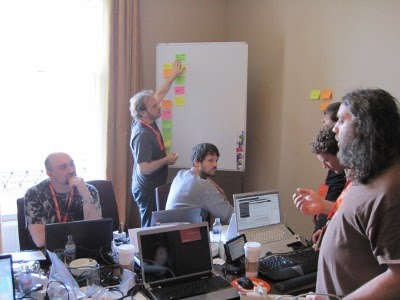
I was able to attend a few UDS sessions throughout the week, but my main mission was an on-site sprint with my team at Canonical (ISD). Our team is globally-distributed, and this was my first chance to meet and work with all of them in person. While the entire summit was awesome, my most lasting memories will be of sitting crammed in a hot hotel room with a dozen of the finest hackers/colleagues I have ever worked with. As a new member to ISD, they made me feel welcomed and let me jump right in.

Can't wait until next UDS!