June 9, 2011

Python - Headless Selenium WebDriver Tests using PyVirtualDisplay

I need to integrate my functional UI tests (Selenium/WebDriver) with my Jenkins CI system. The problem is that my Jenkins CI server has no display, so I must run my GUI tests in a headless X-server.

A colleague pointed me to PyVirtualDisplay, a Python wrapper for Xvfb and Xephyr.

This makes running headless Python Selenium/WebDriver tests very easy.

Here is some Python code showing WebDriver with a virtual display provided by Xvfb:

    
#!/usr/bin/env python

from pyvirtualdisplay import Display
from selenium import webdriver

display = Display(visible=0, size=(800, 600))
display.start()

# now Firefox will run in a virtual display. 
# you will not see the browser.
browser = webdriver.Firefox()
browser.get('http://www.google.com')
print browser.title
browser.quit()

display.stop()

install PyVirtualDisplay on Ubuntu/Debian:

$ sudo apt-get install xvfb python-pip
$ sudo pip install pyvirtualdisplay

June 8, 2011

Python - Selenium WebDriver - Capture Screenshot

Example of capturing a screenshot from Selenium WebDriver in Python:

 
#!/usr/bin/env python
from selenium import webdriver

browser = webdriver.Firefox()
browser.get('http://www.ubuntu.com/')
browser.save_screenshot('screenie.png')
browser.quit()

selenium/webdriver bindings for Python: http://pypi.python.org/pypi/selenium

May 15, 2011

Ubuntu Developer Summit, Oneiric Ocelot

I just got back from UDS-O (Ubuntu Developer Summit, Oneiric Ocelot) in Budapest, Hungary. It was my first UDS, and my first time in Eastern Europe.

I was really worried that the time-change and jet-lag going to eastern Europe would mess me up. However, I felt really good the entire trip and adjusted almost instantly. My mood was good and I was ready to hack.

Some quick comments about the summit:

  • Budapest was fun and interesting, with beautiful weather and historic architecture.
  • The Ubuntu summit is a very well run event, where important decisions are made and work gets done.
  • Our Community rocks!
  • Ubuntu rocks!

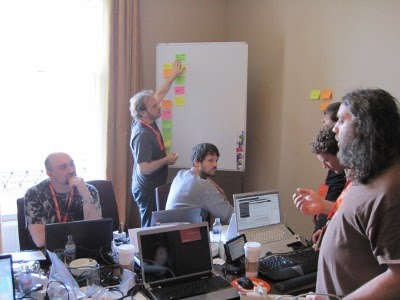
I was able to attend a few UDS sessions throughout the week, but my main mission was an on-site sprint with my team at Canonical (ISD). Our team is globally-distributed, and this was my first chance to meet and work with all of them in person. While the entire summit was awesome, my most lasting memories will be of sitting crammed in a hot hotel room with a dozen of the finest hackers/colleagues I have ever worked with. As a new member to ISD, they made me feel welcomed and let me jump right in.

Can't wait until next UDS!

March 31, 2011

Performance and Scalability Testing with Python and Multi-Mechanize

I put together a slide-deck to help introduce Multi-Mechanize. I wanted something a little friendlier and easier to digest than "go read the project wiki". (It is also the basis of a presentation/talk I might give someday).

Hopefully, this will help people better understand what the project is all about.

March 22, 2011

linux-metrics - Python Package - System Metrics/Stats for Linux

I just released my Python package: 'linux-metrics'

linux-metrics contains Python modules for getting OS metrics on systems running the Linux (2.6) kernel. It is a pure python library with no external dependencies.

This project is under development, and nowhere near comprehensive. Only basic stats for major subsystems are provided (Processor/CPU, Disk, Memory, Network). Hopefully, more are coming.

January 25, 2011

Going to PyCon 2011!

This year I am attending my first PyCon (the annual Python community conference).

I will be in Atlanta: March 10-13.

If anyone is interested in meeting up or collaborating while I'm there, get in touch:

PyCon 2011, Atlanta, March 9-17

December 1, 2010

Python - Search a Local or Remote Splunk Server

Some basic instructions for searching Splunk from Python...

First, you must install Splunk on the machine you will run the Python script from. Splunk installs its own Python interpreter that you can use to run your code. I am using Splunk 4.14, which includes Python 2.6.

(It looks like you can set some environment variables and install a few Python dependencies along with the Python SDK and get this going "outside" of Splunk. But the easiest option is just to run on their interpreter).

To run your own Python scripts on Splunk's interpreter:
- save script into Splunk's "bin" directory
(usually "/opt/splunk/bin" or "C:\Program Files\Splunk\bin")
- go to the "bin" directory and run:
splunk cmd python your_script.py

So...
What goes in your Python code?

First, import the modules you will need:

 
import time
import splunk.auth
import splunk.search

Next, authenticate and get a session key.

For the local splunk host:

 
key = splunk.auth.getSessionKey('user', 'password')

If you are going to search a remote splunk host, you must authenticate against it by adding the "hostPath" parameter:

 
key = splunk.auth.getSessionKey('user', 'password', hostPath='https://mysplunk:8089')

Tips:
- use https, even if you are not using ssl in your splunk web interface
- 'admin' user doesn't seem to work. user a normal user/password.

Next, submit a search job.

For a local search:

 
job = splunk.search.dispatch('search index="os" *', earliest_time='-15m')

For a remote search, use the "hostPath" parameter again:

 
job = splunk.search.dispatch('search index="os" *', earliest_time='-15m', hostPath='https://mysplunk:8089')

print the job details:

 
print job

wait for the results:

 
while not job.isDone:
    time.sleep(.25)    

print results

 
for result in job.results:
    print result

Altogether in a Python script:

 
#!/usr/bin/env python
# Corey Goldberg - 2010
# 
#  search a remote splunk server
#
#  instructions:
#   - save script into splunk's "bin" directory
#     (usually "/opt/splunk/bin" or "C:\Program Files\Splunk\bin")
#   - go to the "bin" directory and run: 
#     $ splunk cmd python my_script.py
#


import time
import splunk.auth
import splunk.search


SPLUNK_SERVER = '192.168.12.173'
USER_NAME = 'foo'
PASSWORD = 'secret'
SEARCH_STRING = 'search index="os"'
EARLIEST_TIME = '-15m'


def main():
    # authenticate
    key = splunk.auth.getSessionKey(USER_NAME, PASSWORD, hostPath='https://%s:8089' % SPLUNK_SERVER)
    print 'auth key:\n%s' % key
    
    # submit a search job
    job = splunk.search.dispatch(SEARCH_STRING, earliest_time=EARLIEST_TIME, hostPath='https://%s:8089' % SPLUNK_SERVER)
    print 'job details:\n%s' % job

    # wait for results
    while not job.isDone:
        time.sleep(.25)
    
    print 'results:'    
    for result in job.results:
        print result


if __name__== '__main__':
    main()

October 8, 2010

Python - Shorten a URL Using Google's Shortening Service (goo.gl)

Using Python to shorten a URL with Google's shortening service (goo.gl):

 
#!/usr/bin/python 
#  Corey Goldberg - 2010

import json
import urllib
import urllib2


def shorten(url):
    gurl = 'http://goo.gl/api/url?url=%s' % urllib.quote(url)
    req = urllib2.Request(gurl, data='')
    req.add_header('User-Agent', 'toolbar')
    results = json.load(urllib2.urlopen(req))
    return results['short_url']


if __name__ == '__main__':
    print shorten('http://www.goldb.org/')
    print shorten('www.yahoo.com')

You give it a URL to shorten: shorten('http://www.goldb.org/long_url')

... and it returns a shortened URL for you: 'http://goo.gl/jh4W'